After months of playtesting and refinement, Riot Games is finally bringing WASD controls to Ranked play with the launch of Season 2 in patch 26.9. Here’s a full breakdown of what’s changing, what’s been tuned, and what new options are available to all players
WASD Is Ranked-Ready
The two benchmarks Riot set for themselves were simple. WASD shouldn’t be overpowered, and win-rate differences between control schemes should be minimal. According to the dev team, both criteria have been met. Point and Click still holds a slight advantage in win-rate, but the gap is narrow enough that Riot is comfortable with the rollout, and they expect it to close further as players develop WASD mastery.
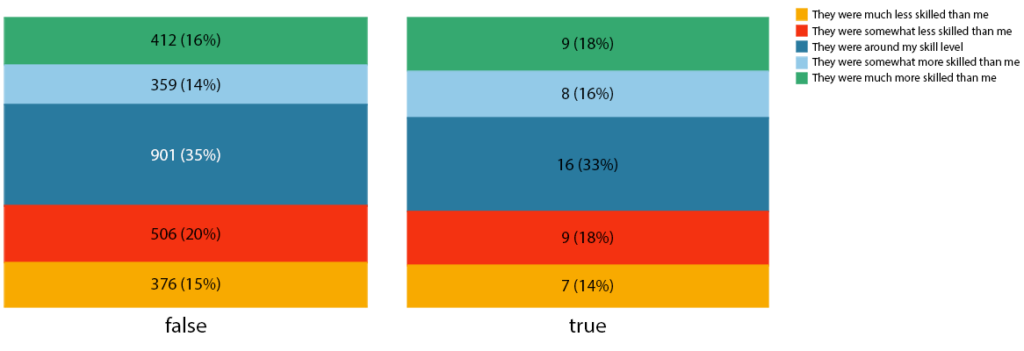
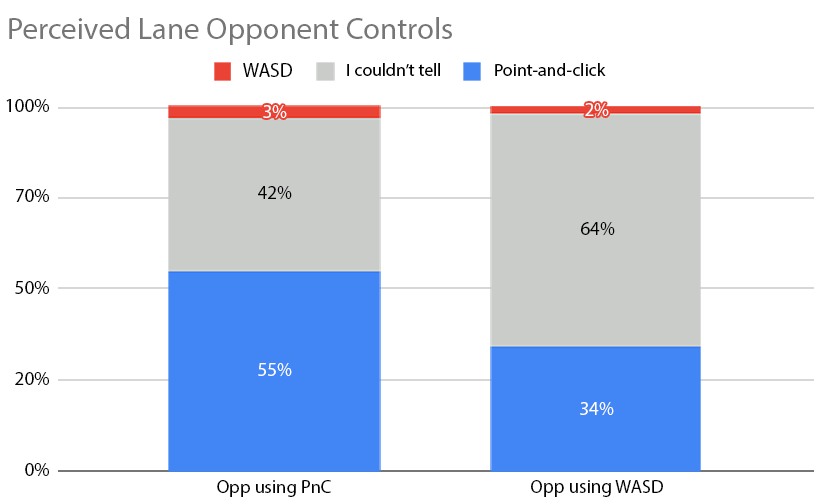
To back up the numbers, Riot also ran blind sentiment surveys, asking players to rate their lane opponent’s skill level and guess what control scheme they were using. The result? Players were largely unable to tell the difference. That’s a strong signal that WASD isn’t producing obviously robotic or exploitable movement patterns at the competitive level.
What Got Polished Before Ranked
Pathfinding Near Walls
One of the biggest friction points with WASD is walking directly into terrain. Unlike Point and Click, where your champion automatically routes around obstacles, WASD movement is immediate and directional. Riot spent significant time calibrating how champions slide along curves versus stop at hard walls.
A key quality-of-life fix: when your camera is panned away from your champion, WASD pathfinding now automatically routes around all walls rather than letting you clip and get stuck. No more thinking you’re en route to a gank only to find your jungler wedged in the blue buff alcove.
Auto-Attack Follow-Up Logic
Some abilities, like Tristana’s Explosive Charge, are designed to automatically queue an auto-attack afterwards. With WASD, that “locked-in” auto can feel punishing since attacks can’t be cancelled mid-animation. Riot went through dozens of champion abilities and toggled this behaviour on or off per ability when WASD is active. This was based on what felt right in practice.
Champion-Specific Keybinds (Live in Patch 26.8)
A long-requested feature is finally arriving: you can now set different keybinds on a per-champion basis, for both Point and Click and WASD. This includes ability hotkeys, smart cast toggles, and more. Rumble and Viktor players, especially, will want to head into the Practice Tool before their next game.
New Accessibility Options

The input system overhaul opened the door to several new accessibility features:
- Move the cursor with custom inputs: the most-requested accessibility feature is now live for everyone.
- Joystick support: WASD can be remapped to joystick inputs for accessibility-oriented controllers. Full controller support is still not planned, but this covers the gap for many players.
- Rotate WASD with map orientation: pressing W will now move you up-right, and S will move you down-left along the lane direction. Handy for laptop players with limited simultaneous key inputs.
- Expanded keybinding freedom: MB1 (left mouse button) can now be freely rebound inside League’s options menu, and all keyboard keys except Delete and Escape are available.
- Split mouse interaction options: Select Object, Interact with Object, Auto Attack, and Cast Ability are now separate, individually bindable actions instead of one shared input.
Bugs Worth Knowing About (Now Fixed)
A few memorable ones from development: Syndra was pathfinding around her own orbiting spheres, causing a subtle wiggle on straight-line movement. Aphelios could auto-attack an enemy exactly once while dead, if Infernum was equipped and specific conditions were met. And Warwick could drift in arbitrary directions mid-Jaws of the Beast dash if a directional input was held. All have been resolved.
You can check out lots of cool images and GIFs on the official Riot Games post that goes over the WASD changes.